

Most design and renovation businesses have a contact form. Name, email, message, submit. It was added when the website was built, and nobody has touched it since.
Then the enquiries arrive,e and they are useless. “Hi, I’m interested in a quote.” No room, no budget, no timeline, no indication whether this is a serious project or someone six months from thinking about it.
So you spend forty minutes on a call finding out what a well-built form could have told you in ninety seconds. That gap between a contact form and a client intake form is worth more than any amount of additional traffic.
The short answer
A client intake form qualifies and routes, whereas a contact form merely collects. It asks about scope, budget range, timeline driver,r and decision authority before the first call rather than during it.
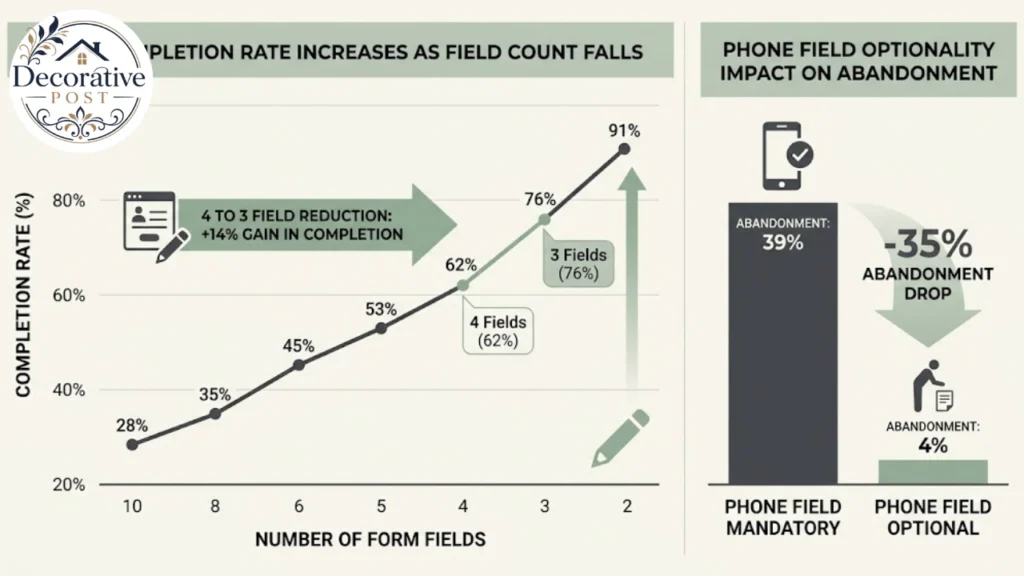
The research is blunt about length. Cutting a form from four fields to three improves completion by around 50 percent, and a three-field form is cited as guaranteeing a minimum conversion rate of around 25 percent.
The resolution of that tension fewer fields, more information —is conditional logic. Branch the questions so each person sees only what applies to them.
Contact form versus intake form
Worth separating properly, because most businesses think they have a client intake form and actually have a contact form.
A contact form opens a conversation. Minimal fields, no qualification, and the work of understanding the project happens afterwards on a call.
A client intake form does the qualifying work upfront. It gathers the information that determines whether this is a fit, routes the enquiry to the right person, and sets expectations about how you work.
The difference shows up in your calendar. A contact form fills it with discovery calls, most of which end in a polite no. An intake form fills it with fewer calls that are mostly worth having.
It also signals something. For a design studio or a contractor, the intake form is frequently the first real interaction a prospect has with how you operate. A thoughtful one reads as professional; a three-field afterthought reads as someone who has not thought about their own process.
The useful framing: ten well-qualified leads with complete information beat fifty incomplete submissions. That is the whole argument for doing this properly.
What the research actually says about length
Specific figures, because this is where opinion usually substitutes for evidence.
Four fields to three improves completion by about 50 percent. That is HubSpot data, and it is the single most quoted finding in form design for good reason: the marginal cost of each additional field is far higher than it feels when you are building the thing.
A three-field form is cited as delivering a minimum conversion rate of around 25 percent. Quicksprout’s figure sets a useful benchmark.
Making a phone number optional reduced abandonment from 39 percent to 4 percent. One study, and a dramatic result. A phone number is the field people most resent giving, because it predicts a call they did not ask for.
CAPTCHA costs around 3 percent of total conversions, per a Moz study. Spam protection is necessary, but there are quieter ways to do it than a challenge the user has to solve.
Button copy matters more than it should. HubSpot found that replacing “submit” with wording like “go” or “click here” raised conversions by roughly 25 to 30 percent. An OptinMonster study found first-person copy,py “get my quote” rather than “get your quote improved conversions by up to 25 percent.
That last one is nearly free to implement, which makes it the highest-return change on this list.
The tension this creates. You need more information than a three-field form collects, and every field you add costs you completions. Which is precisely what the next section solves.
Conditional logic: the actual answer
This is the technique that resolves short-form conversion rates with long-form information, and it is underused by small service businesses.
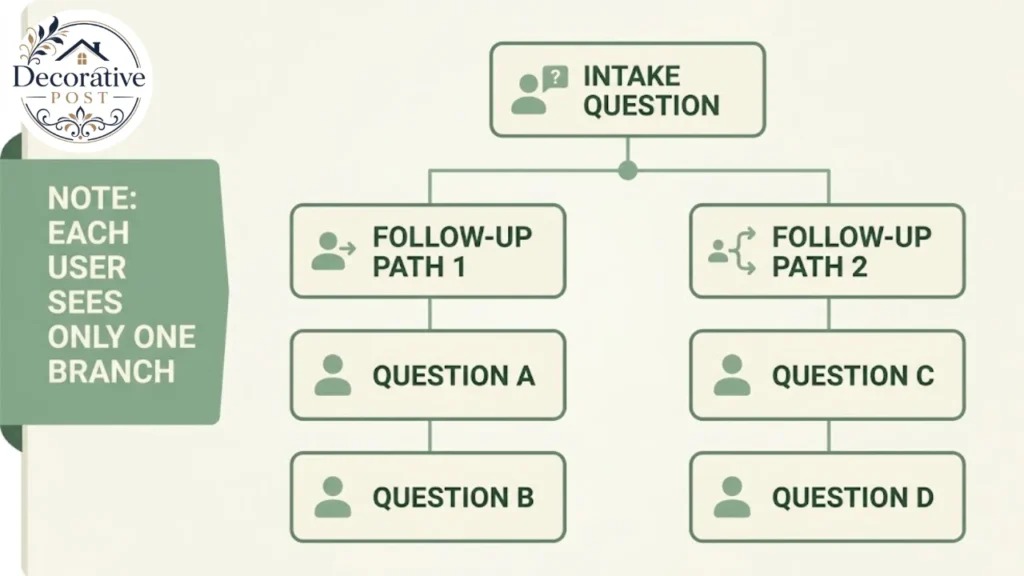
How it works. The form shows only the questions relevant to the answers already given. Someone answering “kitchen” never sees the bathroom questions. Someone with no existing design brief never sees the questions about their existing brief.
A worked example for a design business. Ask “do you have a floor plan or drawings?” A yes branches to a file upload. A no branches to “roughly what are the room dimensions?” Neither person sees the other’s question.
The conversion effect is real. One documented case study a vendor’s own, so treat it accordingly reported a 30 percent increase in submissions after implementing conditional logic.
The perceived length is what matters. A form with forty possible questions that shows any individual eight feels like an eight-question form. People abandon based on what they can see, not what exists in your form builder.
Test every path. This is where conditional forms break, and the failures are invisible until someone reports them. Dead ends, circular loops, unhandled “other” selections, and required fields that only appear under certain conditions are the common ones.
Walk every branch yourself before publishing. Then have somebody else walk them, because you know where the questions go and they do not.
The questions worth asking
Organised by what each one earns you. Not all of these belong on a single client intake; pick the ones that change your decision.
Qualification
Budget range, presented as options rather than a blank field. Do not ask “what is your budget?” People either lowball, abandon, or write “not sure.”
Instead, present investment ranges tied to outcomes. “£5,000–£10,000: single room, furnishings and styling. £10,000–£25,000: full room renovation including trades.” People self-select accurately against outcomes in a way they will not against a number.
Timeline, framed by what is driving it. Not “when do you want to start” but “what is driving the timing?” Options like “moving in next month,” “before a specific event,” or “exploring options” tell you far more.
A near-term driver is a live lead. “Exploring options” is a nurture contact, and knowing the difference changes how fast you respond.
Decision authority. Phrased gently: ” Who else will be involved in the decision?” A project with an unmentioned second decision-maker is where proposals go to die.
Scope
Which rooms or areas, as a multi-select. This single question determines the size of the job better than any other.
Essential versus nice-to-have. Ask people to mark which elements are must-haves and which can wait. This sets scope boundaries before you have quoted anything, and it is the question that prevents the most expensive misunderstandings.
Current state. Is this a new build, renovation, or redecoration of a finished space? Entirely different jobs.
Existing constraints. Rented or owned, listed building, strata or HOA restrictions, structural limitations.
The substance of the work
These are where a design or renovation intake form earns its keep, because they reveal taste and expectations in ways a conversation often does not.
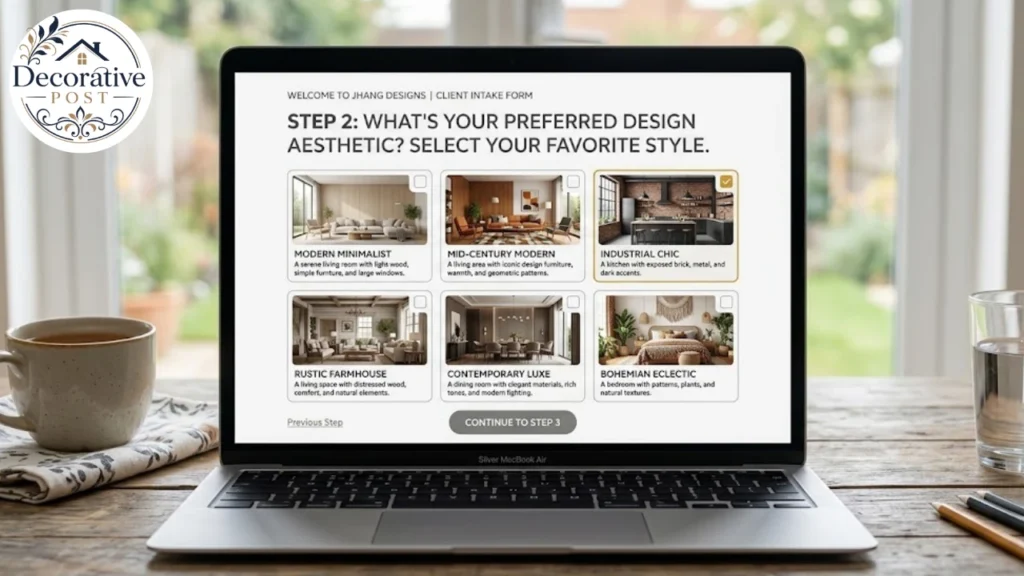
Style direction, ideally visual rather than verbal. People describe their taste inaccurately and recognise it reliably. A set of images to pick from beats a text field asking for “preferred style.”
Fixed elements they are keeping. Flooring, countertops, cabinetry, a sofa they will not part with. This is the information that most often arrives too late.
Known problem areas. Low light, awkward proportions, a room that never feels warm. Clients know these and rarely volunteer them.
Logistics
Contact details, kept to the minimum that lets you reply. Email is essential; phone should be optional, for the reason covered above.
Preferred contact method and times. Cheap to ask, and it removes a round of scheduling friction.
How they found you. One field, and it is the only marketing attribution most small businesses will ever have.
Open-ended, at the end
“What would make this project a success for you?” The single most useful question on most intake forms, and it belongs last where it will not deter anyone.
“Any concerns about working with a designer or contractor?” Surfaces the objection you would otherwise meet in the proposal stage.
Keep open fields optional. A required essay question at the end of a form undoes everything the rest of the design achieved.
Structural decisions that affect completion
The layout choices, each with evidence behind it.
Labels above fields, not beside them. Eye-tracking research supports it, and it reads faster. Long blocks of text anywhere near a form reduce conversion.
Field width should match the expected answer. A first-name field as wide as the screen is a small confusion. Most first names are eight characters or fewer, and sizing the box accordingly tells the user what you want without instruction.
Single column by default. It scans in one vertical pass. One HubSpot test found a two-column layout outperformed for a long form, so this is not absolute, but single column is the safer starting point and far better on mobile.
Multi-step rather than one long page, for anything substantial. Form statistics generally favour multi-page over long single-page forms, and the psychology is straightforward: three short screens feel shorter than one long one,e even when the field count is identical.
Show a progress indicator on multi-step forms. People tolerate a known quantity of remaining effort and abandon an unknown one.
Inline validation. Flag an error at the field, as it happens, rather than on submit. A form that rejects everything after submission and makes the user hunt for the problem is the worst version of this.
Mark optional, not required. If most fields are mandatory, asterisks everywhere are noise. Label the optional ones instead,d and the form reads as shorter.
Ask easy questions first. Momentum is real. Contact details and simple selects at the start, thinking-required questions later, open text last.
Mobile, which is where most forms are actually filled
Worth its own treatment, because desktop-designed forms fail here specifically.
Use the right input types. A numeric keypad for phone numbers, an email keyboard for email. This is a one-attribute change,e and it removes real friction.
Tap targets need to be large. Small radio buttons and tight checkboxes are a desktop habit that punishes thumbs.
Avoid long dropdowns. A select with thirty options is painful on a phone. Radio buttons for short lists, search-enabled selects for long ones.
Test on an actual phone, not a resized browser window. The keyboard covering the field you are typing into is a problem that only appears on a real device.
Keep the submit button reachable. A button that requires scrolling past validation errors loses people who were otherwise finished.
Most enquiry traffic for home and design services arrives on a phone, frequently in the evening, frequently while the person is sitting in the room they want to change. Design for that context rather than for your desk.
What happens after submit
The half of the system that gets neglected, and the half that determines whether a good client intake form is worth anything.
The confirmation message should set expectations. Not “thank you for your submission.” Tell them what happens next and when: ” We’ll review this and come back to you within one working day.”
Send a confirmation email. It gives them a record, it confirms you received it, and it is the first thing in their inbox from you.
Route automatically. Submissions should reach the right person based on what was selected. A kitchen enquiry and a full-house renovation should not land in the same undifferentiated inbox.
Score the leads. A simple scoring rule: near-term timeline plus a budget range above your minimum plus decision authority flags the enquiries worth calling today. Others get a standard response window.
Feed it into whatever you use to track work. Even a spreadsheet beats an inbox, because an inbox has no state. The tracking discipline matters more than the tool.
Respond fast to the hot ones. Response time is one of the strongest predictors of whether an enquiry converts, and an intake form that identifies urgency is wasted if everything gets answered on Friday.
Reviewing whether it works
Most businesses build an intake form once and never look at it again. Four things worth checking quarterly.
Completion rate. What proportion of people who start the form finish it. If this is low, the form is too long or asking something people object to.
Where people drop. Form analytics will show the field people abandon on. It is almost always budget, phone number, or a required open-text question.
Whether the answers predicted reality. Take your last few completed projects and compare what the client said at intake to what the job turned out to be. If intake answers consistently understate scope, the questions need rewording.
Whether the qualified leads converted. If your high-scoring leads are not closing, your scoring criteria are measuring the wrong things.
That third check is the one almost nobody does and the one that improves the form fastest.
Common mistakes
Treating it as a contact form with more boxes. The point is qualification and routing, not data collection for its own sake.
Asking for budget as an open field. Ranges tied to outcomes, every time.
Making phone number required. The evidence on abandonment here is dramatic enough to override any internal preference for calling people.
A required open-text question. Optional, and at the end.
Adding fields because somebody might want that data. Every field costs completions. If the answer does not change what you do, cut it.
Untested conditional branches. Walk every path before publishing.
No post-submit expectation setting. A silent confirmation screen starts the relationship with uncertainty.
Asking what you could look up. Company name and website are often enough to find what you were going to ask three questions about.
A worked example for a design or renovation business
A structure that balances the research against the information you genuinely need.
Step one:e the easy questions. Name. Email. Postcode or area. “What are you looking to do?” as a multi-select: single room, multiple rooms, whole property, consultation only.
Step tw: scope, branched on the above. Which rooms, shown as a multi-select relevant to their first answer. Current state: new build, renovation, redecoration. Rented or owned.
Step three: the project itself. Timeline driver, as options. Budget range, as outcome-linked bands. Style direction, as images to select. Fixed elements being kept, as a short text field or checklist.
Step fou: the useful extras, all optional. Floor plan upload, if they have one. “What would make this a success?” “Anything else we should know?” Preferred contact method.
Four short screens, a visible progress indicator, roughly eight to twelve questions seen by any individual, and a branch structure that means a consultation enquiry never sees the whole-property questions.
That form will tell you more than a forty-minute call and take the client under three minutes.
Why the substance questions matter most
A point specific to design and home improvement work, and the reason a generic form template underperforms here.
The questions that save you the most time are the ones about decisions the client has already half-made and has not told you about. A countertop they have chosen. A paint colour they have fixed on. A sofa that is staying.
Those constraints shape everything downstream, and discovering them in week three rather than at intake is where projects lose their margin.
Ask about fixed finishes explicitly. A client who has already chosen a white has effectively set the palette for the room. Thethe behaviour of a soft white like White Dove in a north-facing room is a very different starting point from a bright one, and knowing it upfront changes what you propose.
Ask about material decisions already taken. Someone who has committed to a particular kitchen backsplash or a cabinet style has constrained the countertop, the finish,h and often the lighting. The intake form is the cheapest place to find that out.
Ask about the furniture staying. A client who is keeping a reclining sofa has set a clearance requirement that affects the entire layout, and they will not think to mention it because to them it is just the sofa.
Ask about the spaces people forget to mention. Basements and utility areas rarely appear in an initial enquiry and frequently turn out to be in scope. A single checkbox asking whether a basement or laundry area is included catches it, and both carry constraints a client will not volunteer.
Ask about known problems. “Is there anything about this space that does not work?” A client describing a room that always feels cold or dark is telling you something useful, and the fix is often in the flooring, the lighting, the tinting,g or the layering covered in our guide to a cozy living room rather than in the decoration.
Ask whether the flooring is in scope. It rarely appears in an initial enquiry and it changes the sequence of every other trade. A below-grade room in particular needs the moisture questions in our basement flooring guide answered before anything is specified.
Each of those is one form field. Collectively,ly they prevent the revision cycle that eats the profit on small projects.
Compliance and data handling
Brief, because it is not optional and it is easy to get adequate.
Collect only what you need. This is both a conversion principle and a data protection one, which is a convenient alignment.
Say what you will do with it. A single line beneath the form, linking to a privacy policy. It takes a sentence,e and it is expected.
Get consent separately for marketing. An unchecked box for newsletter opt-in, distinct from the enquiry itself. Pre-ticked boxes are not consent in most jurisdictions.
Secure the transmission. HTTPS and a form service that does not email submissions in plain text if the questions are sensitive.
Have a retention position. How long you keep enquiries that did not convert. Indefinitely is not an answer.
If you handle file uploads, think about where those files live and who can reach them. Client floor plans and photographs of their home are more sensitive than people assume.
None of this requires a lawyer for a small service business. It requires one paragraph of thought and a privacy policy page.
Tools, briefly
Deliberately short, because the structure matters far more than the platform.
Most website platforms include a form builder adequate for a simple client intake form. The features worth checking for are conditional logic, multi-step support, file uploads, and the ability to route notifications based on answers.
Dedicated form services add better analytics, which is how you find out where people abandon. That data is worth more than most of the other features combined.
Purpose-built client intake and portal products exist, and they add the post-submission steps: e-proposals, onboarding, document sharing, g rather than just the form. Worth considering if the handover after enquiry is where your process is weakest rather than the enquiry itself.
What not to do: build something custom unless you have a reason. The form is not where a small business should spend development budget.

The short version
Fewer visible fields than you think, because four to three is a 50 percent swing in completion.
Conditional logic so the form is long in capability and short in appearance.
Budget as outcome-linked ranges, never an open field.
Timeline framed by its driver, not a date.
Phone optional. The abandonment data is too stark to ignore.
Multi-step, single column, labels above, progress shown.
First-person button copy. “Send my enquiry,” not “Submit.”
Expectations set on the confirmation screen, and an email to follow.
Reviewed quarterly against what your projects actually turned out to be.
A good client intake form is not a longer contact form. It is the first part of your process rather than a gate in front of it, and the businesses that treat it that way spend noticeably less time on calls that were never going anywhere.
FAQs:
What is a client intake form?
A structured form that qualifies an enquiry before the first conversation,ion gathering scope, budget range, timeline,ine and decision authority, then routing the enquiry to the right person. A contact form collects a message; an intake form collects the information that determines whether and how you proceed.
How many fields should a client intake form have?
As few visible at once as possible. Research found cutting from four fields to three improved completion by around 50 percent, and a three-field form has been cited as achieving a minimum 25 percent conversion rate. Use conditional logic to ask more without showing more.
Should a client intake form ask for budget?
Yes, but as pre-set ranges tied to outcomes rather than an open field. An open budget question produces lowballing, abandonment, or “not sure.” Ranges linked to what each buys let people self-select accurately.
Should phone number be required on an intake form?
No. One study found making the phone field optional reduced abandonment from 39 percent to 4 percent. Email is sufficient to reply, and people who want a call will supply a number.
Do multi-step forms convert better than single-page forms?
Generally yes for longer forms. Three short screens feel shorter than one long page even at identical field counts, and a progress indicator helps further by making the remaining effort knowable.
What should the submit button say?
Not “submit.” HubSpot found alternatives like “go” or “click here” raised conversions by roughly 25 to 30 percent, and first-person copy such as “get my quote” has been found to outperform second-person phrasing by up to 25 percent.
Does CAPTCHA hurt conversions?
Yes, modestly. One Moz study put the cost at around 3 percent of total conversions. Honeypot fields and time-based checks give spam protection without asking the user to solve anything.
How often should I review my intake form?
Quarterly. Check the completion rate, where people abandon, whether the answers accurately predicted actual project scope, and whether your highest-scoring leads actually converted. The scope-accuracy check is the one most businesses skip and the one that improves the form fastest.